
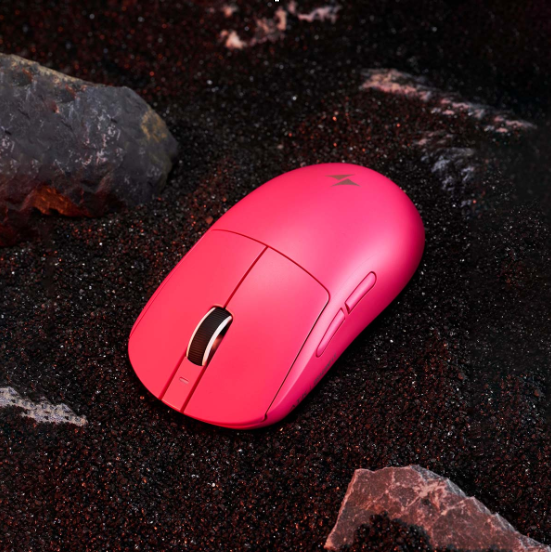

In the high-stakes arena of esports, where milliseconds separate champions from runners-up, every piece of equipment matters. A single missed flick shot, an imprecise crosshair placement, or a delayed reaction can cost a player the round—and potentially an entire tournament. Yet despite investing countless hours into practice and strategy, many gamers unknowingly handicap themselves with a mouse that doesn’t match their grip style or deliver the sensor precision their gameplay demands. The result is inconsistent aim, premature hand fatigue, and a persistent feeling that something just isn’t clicking.
A well-chosen wireless gaming mouse bridges the gap between raw talent and peak mechanical performance. Modern wireless technology has eliminated the latency concerns that once kept competitive players tethered to their desks, opening the door to unrestricted movement without sacrificing responsiveness. This article explores how esports professionals and aspiring competitors can unlock their full potential by understanding three critical areas: grip types and how they influence mouse ergonomics, the sensor technologies that drive pinpoint accuracy, and a practical step-by-step framework for selecting the wireless gaming mouse that fits your unique needs.
Understanding Grip Types and Ergonomic Mouse Design
The way your hand wraps around a mouse dictates everything—from how quickly you can snap to a target to how long you can play before fatigue sets in. Most gamers develop a grip style instinctively, rarely questioning whether their mouse actually complements the way they hold it. This mismatch is one of the most overlooked performance bottlenecks in competitive gaming. Understanding the three primary grip styles—palm, claw, and fingertip—and how ergonomic mouse design caters to each one gives players a tangible edge that no amount of sensitivity tweaking can replicate.
Common Grip Styles: Palm, Claw, and Fingertip
Palm grip is the most relaxed approach, where the entire hand rests flat against the mouse with fingers extended across the buttons. It offers excellent stability for sweeping, low-sensitivity movements common in tactical shooters, though it sacrifices some agility in rapid directional changes. Claw grip creates an arch in the fingers while the palm’s base still contacts the rear of the mouse, striking a balance between control and quick clicking—ideal for players who need both tracking precision and fast burst inputs. Fingertip grip is the most nimble style, with only the fingertips touching the mouse and the palm hovering entirely off the surface. This grants maximum micro-adjustment speed, making it popular among high-level FPS players, but it demands more muscular effort and can lead to faster fatigue without the right mouse shape. Ergonomically, palm grippers benefit from larger mice with pronounced rear humps, claw users thrive with medium-profile shells that support the arch without restricting finger movement, and fingertip players need compact, lightweight designs that allow effortless repositioning.
How Ergonomic Shapes Enhance Performance
Mouse curvature is more than an aesthetic choice—it determines where pressure distributes across your hand during intense gameplay sessions. A well-contoured shell channels grip force naturally, reducing the unconscious tension players develop when their hand fights to maintain control of an ill-fitting shape. Weight distribution plays an equally critical role; a mouse that feels front-heavy will drag during flick shots, while a balanced or slightly rear-weighted design lets the wrist guide movements more fluidly. Button placement matters too, because even a millimeter of awkward reach to a side button can break your grip mid-engagement. When curvature, weight, and button positioning align with a player’s grip style, the mouse essentially disappears from conscious thought. Strain drops, aim becomes more instinctive, and the consistency that separates good players from great ones starts to emerge naturally over extended practice sessions.
The Role of Sensor Accuracy in Wireless Gaming Performance
In competitive gaming, your mouse sensor is the translator between physical hand movement and digital crosshair response. Even the most ergonomically perfect mouse becomes a liability if its sensor introduces tracking inconsistencies, smoothing artifacts, or wireless latency spikes during critical moments. Sensor accuracy determines whether your flick lands precisely on an opponent’s head or drifts two pixels wide—a margin that competitive players cannot afford to waste. Modern wireless gaming mice have reached a point where their sensors rival or exceed wired counterparts, but understanding the underlying technology helps players make informed decisions rather than chasing marketing buzzwords.
Key Sensor Technologies: Optical vs. Laser
Optical sensors use an LED to illuminate the surface beneath the mouse and capture movement through an image sensor, producing highly consistent tracking with minimal acceleration or jitter on cloth pads. This predictability is why the vast majority of esports professionals rely on optical sensors—they deliver a near-perfect one-to-one relationship between hand movement and cursor displacement. Laser sensors, by contrast, use infrared laser diodes to track on virtually any surface, including glass and glossy desks, and they can achieve higher native sensitivity ranges. However, laser sensors historically introduced slight acceleration at lower speeds, meaning the cursor could travel farther than intended during slow, precise adjustments. While recent laser sensor generations have narrowed this gap considerably, optical remains the gold standard for competitive play where raw tracking fidelity on a quality mousepad outweighs surface versatility. For esports professionals who train and compete on controlled desk setups with dedicated pads, an advanced optical sensor delivers the most reliable and repeatable performance.
Metrics for Evaluating Sensor Performance
DPI, or dots per inch, defines how far the cursor moves relative to physical mouse displacement—higher DPI means greater cursor travel per inch of hand movement. Most competitive players settle between 400 and 1600 DPI, adjusting in-game sensitivity to complement their preference, so an extremely high maximum DPI matters less than the sensor’s accuracy and consistency at the DPI you actually use. Polling rate, measured in hertz, dictates how frequently the mouse reports its position to the computer; a 1000 Hz polling rate sends updates every millisecond, which is the baseline expectation for competitive wireless mice, though some newer models push to 2000 Hz or even 4000 Hz for marginally smoother tracking curves. Acceleration—or more precisely, the absence of it—is equally important. A sensor with zero hardware acceleration ensures that moving the mouse slowly or quickly across the same distance always produces identical cursor displacement, which is essential for building reliable muscle memory. When evaluating a wireless gaming mouse, look for sensors that combine low motion latency, zero smoothing or acceleration, and a polling rate of at least 1000 Hz to ensure your inputs reach the game engine with the speed and precision competitive play demands.
Choosing the Right Wireless Gaming Mouse: A Step-by-Step Guide
Knowing the theory behind grip styles and sensor technology is valuable, but translating that knowledge into a confident purchase decision requires a structured approach. Too many players browse spec sheets and review roundups without first understanding what they personally need, ending up with a mouse that looks great on paper but feels wrong in practice. The following three-step framework helps you cut through the noise by starting with your body, moving to the technology, and finishing with the practical details that round out a truly competitive setup.
Step 1: Assess Your Grip Style and Hand Size
Before browsing any product page, grab your current mouse and pay attention to where your hand naturally makes contact during an intense gaming session. If your entire palm rests on the shell with fingers laid flat, you’re a palm gripper. If your fingers arch upward while the base of your palm still touches the back, that’s claw grip. If only your fingertips control the mouse with your palm floating freely, you use fingertip grip. Next, measure your hand from the base of your palm to the tip of your middle finger, and across the widest point of your knuckles. Palm grippers with hands over 19 cm generally need mice longer than 125 mm, claw users perform best with medium-length shells around 115–125 mm, and fingertip players should target compact bodies under 120 mm. Cross-referencing your grip type and hand dimensions immediately narrows the field to shapes that will feel intuitive rather than forced.
Step 2: Evaluate Sensor Specifications for Competitive Play
Once you’ve identified the right shape category, filter your options by sensor capability. For esports-level performance, prioritize mice equipped with a modern optical sensor that offers zero hardware acceleration and zero smoothing—these two qualities ensure your muscle memory translates consistently every time you play. Confirm the mouse supports at least a 1000 Hz polling rate, as this is the competitive baseline; if a model offers 2000 Hz or 4000 Hz, that’s a bonus for marginally smoother input registration. Wireless latency should be under one millisecond in the manufacturer’s testing, putting it on par with wired connections. While DPI ranges above 20,000 exist, focus instead on whether the sensor tracks cleanly and accurately at your preferred DPI setting, typically somewhere between 400 and 1600 for competitive titles. A mouse that nails these benchmarks will never be the bottleneck in your performance chain.
Step 3: Top Recommendations and Final Considerations
With grip compatibility and sensor quality confirmed, a handful of additional factors deserve attention before you commit. Weight is a significant differentiator—mice under 70 grams feel almost weightless during fast swipes and are favored by most FPS professionals, while slightly heavier options around 75–85 grams can provide a sense of control that some players prefer for strategy-heavy games. Brands like ATK Gear have focused on delivering lightweight wireless designs with competitive-grade sensors, reflecting the broader industry trend toward ultralight, high-performance peripherals. Check the button layout to ensure side buttons fall naturally under your thumb without requiring you to shift your grip, and verify that the primary click mechanism offers a crisp, low-travel actuation that supports rapid tapping. Battery life should comfortably last through multi-day tournament sessions or long practice blocks without constant recharging; most top-tier wireless mice now deliver 60 hours or more on a single charge. Software customization is worth exploring as well, since the ability to store DPI profiles, adjust lift-off distance, and fine-tune debounce timing on-board means your settings travel with you to any setup. Finally, if possible, test the mouse in person or purchase from a retailer with a generous return policy. No amount of research fully replaces the feedback of holding a mouse during actual gameplay, and giving yourself the freedom to swap ensures you end up with a tool that genuinely elevates your competitive performance.
Elevate Your Aim with the Right Grip and Sensor Combination
The difference between inconsistent aim and reliable, repeatable precision often comes down to a single piece of equipment—your mouse. When grip style, ergonomic shape, and sensor technology work in harmony, the mouse stops being a variable and becomes an extension of your intent. Palm, claw, and fingertip grippers each demand distinct shell profiles, and forcing your hand into the wrong shape introduces tension that compounds over hours of practice and competition. Equally, a sensor plagued by acceleration, smoothing, or wireless latency undermines the muscle memory you’ve worked so hard to build, no matter how perfectly the mouse fits your hand.
The path forward is straightforward: identify how you naturally hold your mouse, measure your hand to find the right dimensions, then filter your choices by sensors that deliver zero acceleration, zero smoothing, and at least a 1000 Hz polling rate. Round out the decision with practical considerations like weight, button placement, battery endurance, and on-board profile storage. Following this structured approach removes guesswork and puts data behind what should be a deeply personal choice. If you’re serious about climbing the competitive ladder, invest the time to find a good wireless gaming mouse that truly matches your grip and tracking needs—it’s one of the fastest, most tangible upgrades you can make to your gameplay.