

Casual gaming and streaming have exploded in popularity over the past few years, with millions of people turning to their monitors not just for competitive play but for relaxed entertainment, content creation, and everyday multitasking. Yet finding a display that truly delivers across all these scenarios remains a persistent challenge. Most standard monitors force users to compromise — settling for washed-out colors, sluggish response times, or poor contrast that dulls the overall experience.
OLED gaming monitors have emerged as a compelling answer to this problem. Unlike traditional LCD and LED panels, OLED technology produces visuals that feel genuinely alive — deep blacks, rich colors, and razor-sharp clarity that transform both gaming sessions and streaming content. For casual users who want immersion without the complexity of high-end setups, OLED strikes an ideal balance. Key advantages include vibrant, true-to-life visuals, adaptive refresh rate capabilities that smooth out gameplay, and wide viewing angles that suit flexible, laid-back usage. Whether you’re exploring an open-world RPG, watching your favorite streamer, or switching over to a spreadsheet mid-session, an OLED monitor handles it all with remarkable consistency.
The OLED Advantage: Revolutionizing Gaming Displays
Traditional LCD and LED monitors rely on a backlight panel that illuminates pixels from behind, which creates an inherent limitation: even in dark scenes, some light bleeds through, resulting in washed-out blacks and limited contrast. OLED — Organic Light-Emitting Diode — technology works fundamentally differently. Each pixel generates its own light independently, meaning it can switch off completely when displaying black. The result is a true, absolute black level that LCD panels simply cannot replicate, paired with an infinite contrast ratio that makes every image feel dimensionally richer.
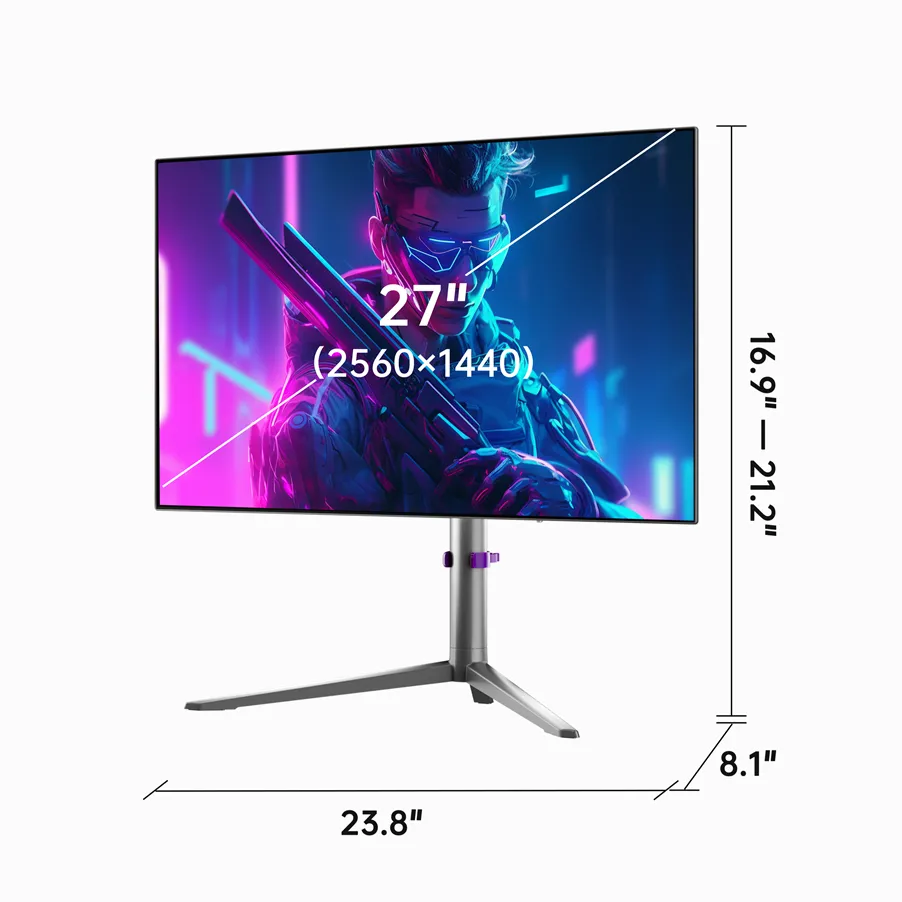
Beyond contrast, OLED displays deliver response times measured in fractions of a millisecond, virtually eliminating motion blur and ghosting that plague faster-paced scenes. This responsiveness comes not from aggressive overdrive settings but from the organic nature of the display itself. Wide viewing angles are another inherent strength — colors and brightness remain consistent whether you’re sitting directly in front of the screen or viewing from the side, a meaningful advantage for relaxed, casual setups where you’re not always perfectly centered.
For gaming specifically, these technical traits translate into tangible experiences: shadows in dark dungeons carry genuine depth, explosions pop with saturated color, and fast movement stays crisp rather than smearing. The combination of perfect blacks, vibrant color reproduction, and near-instant pixel response creates a visual foundation that elevates every type of content. This is precisely why OLED has become the benchmark display technology — and why casual users, who consume a wide range of content across gaming, streaming, and everyday tasks, stand to gain the most from making the switch.
Why Casual Gamers and Streamers Benefit Most from OLED
Unmatched Immersion with Pixel-Perfect Clarity and Vibrant Visuals
For casual users, the visual experience is everything. OLED’s high pixel density and near-perfect color accuracy — often covering over 99% of the DCI-P3 color space — render game environments with a lifelike richness that standard monitors struggle to approach. Playing something like Cyberpunk 2077 or Elden Ring, you’ll notice neon-lit streets glowing with genuine depth or moonlit landscapes carrying atmospheric shadow detail that feels cinematic rather than flat. Streaming content benefits equally: colors stay saturated and true across fast-moving scenes without the bloom or haloing that LCD backlighting introduces. For casual users who aren’t chasing frame-rate records but do care deeply about how their content looks and feels, OLED’s pixel-level precision delivers an immersive quality that turns ordinary sessions into genuinely engaging experiences.
Seamless Switching: Gaming Monitor for Racing and Productivity
One of OLED’s most underappreciated strengths for casual users is its effortless versatility. A single session might involve an hour of racing in Forza Horizon 5, a stretch of video editing, and an evening of streaming — and an OLED monitor handles all three without compromise. Dynamic refresh rate technology, such as NVIDIA G-Sync or AMD FreeSync Premium, synchronizes the display’s refresh rate with the GPU’s output in real time. In racing titles specifically, this eliminates screen tearing through fast corners and high-speed straights, keeping the visual feed smooth and consistent even when frame rates fluctuate. Switching over to productivity tasks, OLED’s accurate color reproduction makes design work, photo editing, and document review genuinely more comfortable, since text appears sharper against true-black backgrounds and color-critical work reflects accurately on screen. The transition between modes is instantaneous — no recalibration, no visible degradation. For casual users who treat their monitor as a central hub rather than a dedicated gaming tool, this adaptability is a practical, everyday advantage that more specialized displays simply cannot offer.
Case Study: The KTC G27P6 Monitor in Action
The KTC G27P6 puts OLED’s theoretical advantages into concrete, everyday practice. Built around a 27-inch OLED panel with 4K resolution and a 240Hz refresh rate, it represents exactly the kind of all-purpose display that casual users need — one that delivers premium visuals without demanding a specialized or complex setup. The combination of resolution and panel technology means individual pixels are essentially invisible at normal viewing distances, producing text, UI elements, and game environments with a sharpness that feels closer to print than to a traditional monitor.
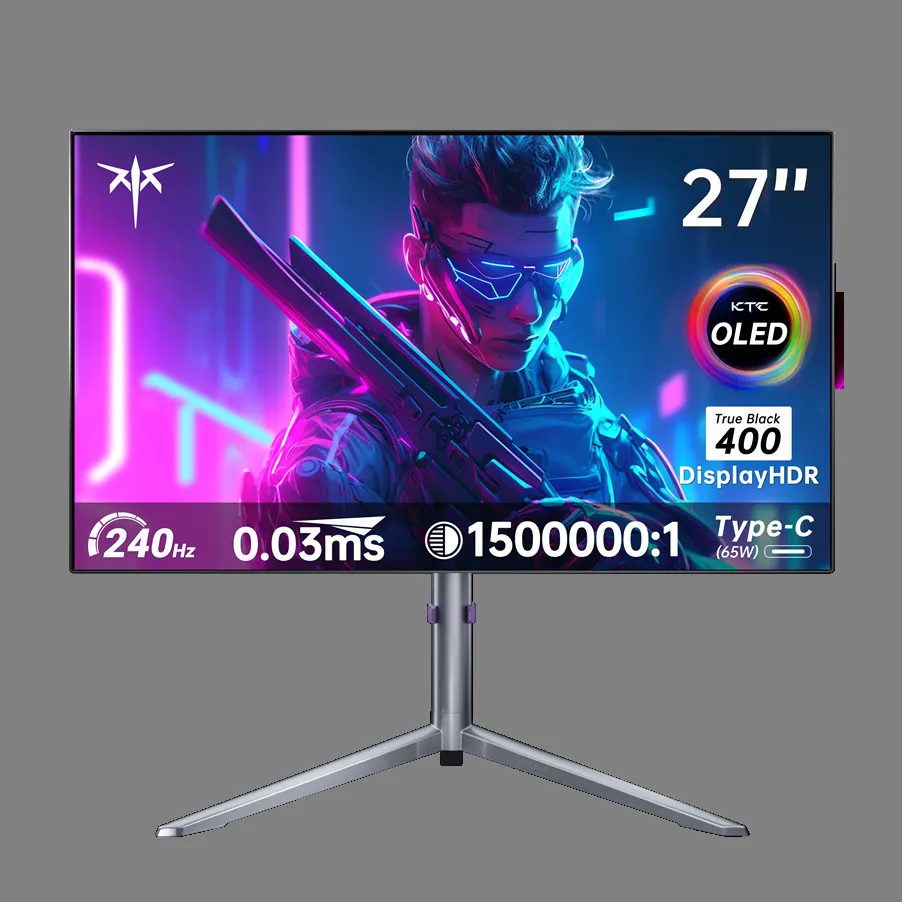
For racing enthusiasts, the G27P6 demonstrates OLED’s dynamic refresh rate capabilities at their most compelling. Running Forza Horizon 5 or Gran Turismo 7, the monitor’s FreeSync Premium support synchronizes its refresh rate dynamically with the GPU output, eliminating screen tearing through high-speed corners and keeping motion fluid even during frame rate dips. The result is a racing experience where the visual feed feels locked to the action — no stuttering, no tearing, just clean, responsive motion that makes every lap feel more immediate and engaging.
Casual streamers benefit just as directly. Watching live content or recorded video, the KTC G27P6’s OLED panel renders fast-moving footage without the motion blur that LCD panels introduce, while its near-perfect black levels give night scenes and dark cinematography genuine depth. Switching from an evening gaming session to a late-night work task, the monitor’s accurate color reproduction and crisp text rendering make the transition effortless. For a casual user looking for one display that genuinely excels across gaming, streaming, and productivity, the G27P6 is a practical, real-world illustration of why OLED has become the standard worth reaching for.
Practical Solutions: Meeting Your Needs with OLED Monitors
Step-by-Step Guide to an Immersive Visual Experience
Getting the most from an OLED monitor starts before you even power it on. First, choose a panel that prioritizes both contrast depth and color gamut coverage — look for displays that cover at least 99% of DCI-P3, since this ensures the colors you see reflect what creators actually intended. Second, calibrate your brightness and color settings immediately after setup. OLED panels can run uncomfortably bright out of the box; dialing brightness down to a comfortable level — typically between 150 and 200 nits for indoor use — preserves eye comfort while letting the panel’s natural contrast do the heavy lifting. Third, be deliberate about the content you prioritize. Games with rich lighting systems, like open-world RPGs or atmospheric horror titles, showcase OLED’s black levels and color depth most dramatically, while HDR-enabled streaming platforms reveal the panel’s dynamic range in ways SDR content cannot. Finally, add a bias lighting strip behind your monitor. This simple addition reduces the perceived contrast between the bright screen and a dark room, easing eye strain during long sessions while simultaneously making the image appear even more vivid and three-dimensional. Together, these four steps transform a capable OLED display into a genuinely immersive environment.
Optimizing Your Setup for Gaming and Productivity
Versatility is only valuable if your setup is configured to use it. Start by exploring your monitor’s built-in presets — most OLED gaming monitors include dedicated modes for gaming, cinema, and sRGB-accurate work. Switching to an sRGB or professional preset during design or document tasks ensures color accuracy without manual recalibration each time. Next, confirm that your GPU’s dynamic refresh rate feature — G-Sync or FreeSync — is enabled in both the driver settings and the monitor’s own menu, so frame-rate synchronization stays active as you move between gaming and productivity without interruption. If you stream or record content, integrate your monitor’s color profile settings with your capture software; matching your display’s output to your streaming platform’s color space prevents washed-out or oversaturated footage. Finally, use your monitor’s adjustable tilt, height, and blue-light reduction settings to maintain physical comfort across extended mixed-use sessions. Small ergonomic adjustments combined with a warm color temperature setting in the evening make sustained use genuinely comfortable rather than fatiguing.
OLED Is the Upgrade Casual Users Have Been Waiting For
OLED gaming monitors represent a genuine leap forward for casual users who want more from their display without overcomplicating their setup. The technology’s core strengths — perfect black levels, infinite contrast, near-instant response times, and accurate color reproduction — aren’t just technical checkboxes. They translate directly into richer gaming sessions, more engaging streams, and more comfortable productivity work, all from a single screen. For users who move fluidly between entertainment and everyday tasks, that versatility is the real value proposition.
The KTC G27P6 illustrates this clearly. Its combination of 4K OLED clarity, 240Hz refresh rate, and dynamic sync support makes it equally at home in a fast-paced racing title and a late-night editing session, delivering pixel-perfect visuals and smooth motion without demanding specialized knowledge or constant recalibration. It’s the kind of all-purpose display that casual users have always needed but rarely found.
As OLED panel technology continues to mature — with improved brightness, reduced burn-in risk, and broader availability — its position as the standard for immersive, versatile displays will only strengthen. For casual gamers and streamers ready to move past the compromises of traditional LCD panels, the upgrade to OLED isn’t just worthwhile. It’s the most impactful single change you can make to how you experience everything on screen.
